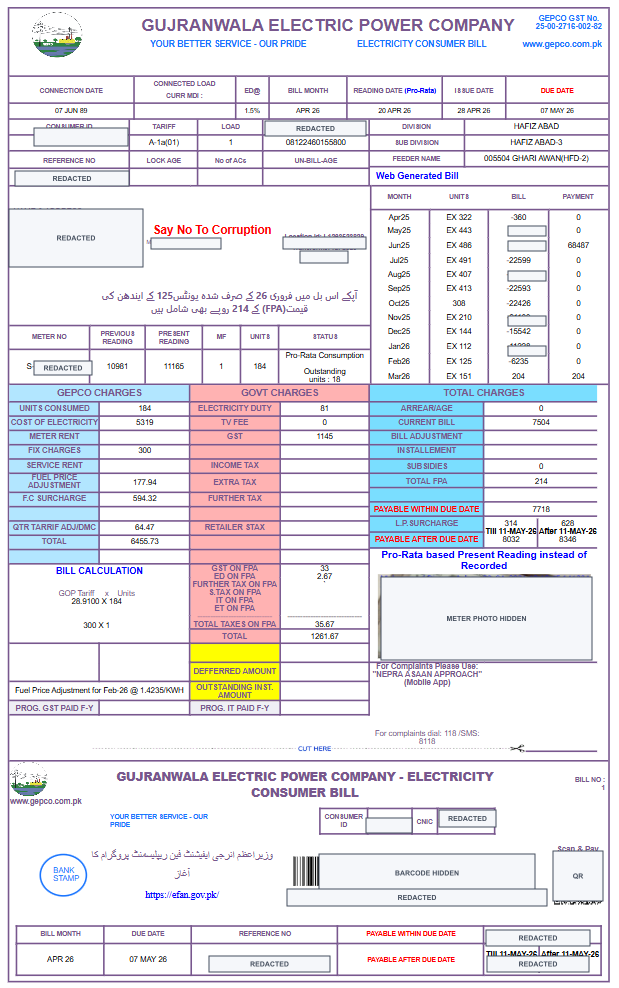
If you are standing at a mobile shop in Gujranwala, or sitting at home with an old GEPCO bill in your hand, the first confusion is usually the same: which number should I enter? The bill has a consumer ID, reference number, meter number, billing month, account fields, and a few codes that look almost the same when you are in a hurry.
For most people, the answer is simple: use the 14-digit Reference Number for duplicate bill checking. If the tool gives you a separate Customer ID option, you can use the Customer ID instead. This guide shows where both numbers appear on a real GEPCO bill layout.
Quick Answer
Look near the upper-left area of your GEPCO bill. The Reference No is the main number for online duplicate bill lookup. The Customer ID is nearby and can also appear on the payment slip at the bottom.
Where to Find the Reference Number
On the sample bill above, the Reference No field is in the upper-left details table, below the consumer ID row. On most GEPCO bills, it is printed as a 14-digit number. This is the number most people use on the GEPCO bill checker.
Type only the digits. Do not add spaces, hyphens, slashes, or any extra letter printed near the number. A clean reference number should look like this:
12345678912345
Where to Find the Customer ID
The Customer ID appears in the bill details section and can also appear on the detachable payment slip near the bottom. In your own bill, look for the label that says CONSUMER ID or Customer ID. The exact label style may vary slightly between printed and web-generated copies.
Use Customer ID only when the bill checker is set to the Customer ID option. If the checker is asking for Reference Number, the customer ID will not work in that field.
Reference Number vs Customer ID
- Reference Number: usually 14 digits and most commonly used for GEPCO duplicate bill lookup.
- Customer ID: another bill identifier that can work when the official or helper tool supports Customer ID search.
- Meter Number: identifies the physical meter, but it is not the normal duplicate bill lookup number.
- CNIC, name, or address: not used for regular online GEPCO duplicate bill lookup.
Which one should you use?
If you are in a hurry, start with the 14-digit Reference Number. That is the number most bill payment shops, mobile apps, and duplicate-bill tools expect. Use Customer ID only when the form clearly gives you a Customer ID option.
Do not use meter number unless a GEPCO office specifically asks for it during a complaint or meter issue. It is useful for office work, but not for normal online duplicate bill checking.
If Your Number Does Not Work
First, check that you selected the correct option: Reference Number or Customer ID. Then remove spaces and retype the number from your latest bill. If your bill still does not open, the official portal may be slow, the bill may not be uploaded yet, or your reference number may have been revised.
Common mistakes are simple: typing the final U or R printed near the number, copying a blurry WhatsApp photo, entering the meter number, or using an old bill after the record has been revised. If you travel between cities and your family sends you a bill photo from home, ask for a clear picture of the top-left details area, not only the payable amount.
For a full troubleshooting checklist, read our guide on why a GEPCO bill is not found online. If the amount opens correctly and you want to pay it from your phone, use the GEPCO online payment guide.
New Connection Users: You May Not Have These Numbers Yet
If you recently applied for a new GEPCO meter, you may have a tracking ID or demand notice instead of a regular monthly bill reference number. In that case, use the official ENC process first. Our GEPCO demand notice guide explains how to check application status and demand notice options.
A Practical Gujranwala Tip
Once you find the correct reference number, save it in your phone contacts or notes as "GEPCO Bill Reference". Many families in Gujranwala keep a photo of the bill in WhatsApp, but old bill photos can become confusing if the reference number changes or the image is blurry. The latest bill is always the better source.
Official sources: This guide is based on GEPCO duplicate bill instructions and the layout of a redacted GEPCO consumer bill. For official duplicate bill lookup, verify through the GEPCO duplicate bill page or the official PITC billing portal.
Frequently Asked Questions
Where is the GEPCO reference number on my bill?
It is usually printed in the upper-left details table under the label Reference No. Use the 14-digit number for duplicate bill checking.
Is Customer ID the same as Reference Number?
No. They are separate identifiers. Use Reference Number when the field asks for Reference Number, and Customer ID when the field specifically asks for Customer ID.
Can I check a GEPCO bill using meter number?
For normal duplicate bill lookup, meter number is not the usual search field. Use the reference number or supported customer ID printed on the bill.
What if I only have a demand notice?
A demand notice is part of the new-connection process. Use the ENC tracking or demand notice options first. After the meter is active and the first monthly bill is issued, you can use the normal reference number or customer ID.